This page documents some cool and interesting projects you can do with relatively cheap Canon digital cameras. Why Canon? Because all manufacturers like to reduce functionality of their cheap digital cameras to a degree where they only good for taking snapshots of friends, family, pets, or tourist locations. Useful functionality like auto-bracketing, time-lapse, motion sensing, etc. are stripped out of the firmware so they can be added as features for higher-end cameras. However, some clever people have developed an improved firmware for the bulk of Canon's consumer digital cameras that provides many or all of these missing features. It's got the memorable name of
Canon Hack Development Kit
(CHDK).
Note that this page is most definately work-in-progress!
-->
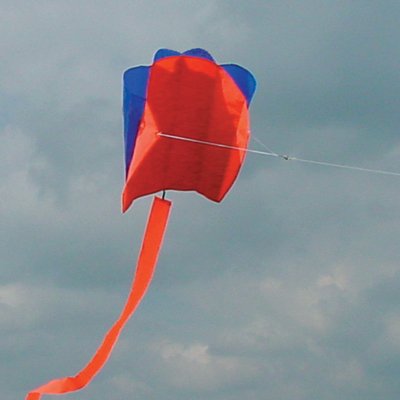
My method of attachment was far from ideal. The camera spun around a lot and most of the photos are very blurred. I'm currently looking into options to remove motion blur. Any suggestions? Obviously the best solution will be to use a more stable way of attaching the camera to the kite.
Also, the kite struggled a little to lift the camera; a slightly bigger kite with more lifting power would be useful. Or a lighter camera!
I've rotated the images around - no work on the motion blur yet though. Click the images for larger versions.
Photographs can only capture a limited range of light levels, whereas the human eye can percieve a large range of light levels, i.e. they have a 'high dynamic range' (HDR).
If you want to capture a photograph of a scene with a large range of light levels, e.g. dark shadowy areas and bright lit areas then you need to take a bunch of photos at different settings. Then you use HDR imaging software (I'm using this free
Qtpfsgui
) to convert the extended dynamic range represented across the series of photos into a single HDR image.
Monitors, being 'normal' dynamic range things cannot display an HDR image so you then need to remap that HDR image to one you can display on normal displays. This is the clever stuff kicks in as there are many ways an HDR image can be converted into a normal image (called 'tone mapping').
Below are the
original images
I used. Note that no single photo captures the best detail in the building and the clouds.
There are many a lot of different algorithms available in
Qtpfsgui
and each has different parameters to play with so there is a lot of experimentation that you can do.
Below are two quite different results, the first using the Fattal algorithm with parameter settings Pre-gamma=0.636, Alpha=0.1, Beta=0.8, Saturation=1, Noise redux=0.099. The second is the result of the Mantiuk with parameter settings Pre-gamma=1, Contrast equalization=1.005, Saturation factor=2
The only retouching that these have had is a little contrast enhancement. The dithering artefacts on them are from the algorithms; I don't know if they can be removed through better parameter settings.
If you want to try these same images they are available
here
and I'd be very interested to see what sort of results you manage to get.
A pretty simple timelapse using one of the CHDK timelapse scripts and captured a series of photos of the sky over Cambridge. I put the sequence of images into the free video editing package
VirtualDub
(just select the first of the sequence in Open Video) and saved out this video.
I set manual focus and white balance with a fixed aperature. Should have probably set manual shutter speed too. Then I ran the 'remote.bas' script and clicked away. Be sure to read the
wiki page
beacause you need to (1) enable remote functionality, and (2) run a remote script on the camera (which I either downloaded or copied from the page). As with the time-lapse, I used
VirtualDub
again to import the sequence and after installing the free
Xvid codec
(which I got from
here
) I could save it out as a little video.
Thanks to Milo for moving the LEGO model and pressing the button!
Next step might be to hack a wireless door bell (or dog training collar) to make a
wireless remote cable
. That would make it useful for aerial kite photography too.
dylski @ 2ne1 . com - Last Updated: Wed, 25th March 2009


 -->
My method of attachment was far from ideal. The camera spun around a lot and most of the photos are very blurred. I'm currently looking into options to remove motion blur. Any suggestions? Obviously the best solution will be to use a more stable way of attaching the camera to the kite.
-->
My method of attachment was far from ideal. The camera spun around a lot and most of the photos are very blurred. I'm currently looking into options to remove motion blur. Any suggestions? Obviously the best solution will be to use a more stable way of attaching the camera to the kite.


.JPG)
.JPG)
.JPG)
.JPG)
.JPG)